Photoshop simply won't load when your chip is old as the one in MacPro3,1, the 2008 edition. I have done some searches on this topic and finally got some workarounds. Unfortunately those workarounds don't workaround for me. Again, after a day or two intensive digging I have to give up on it. It's not worth the trouble.
Saturday, November 13, 2021


Saturday, September 18, 2021
D4s and D700
I've always like the pictures from my D700. There is nothing objective or scientific about it, it's just my beliefs.
I usually shoot with my D810 and D700. The D700 seems to give me more accurate focused pictures. The shutter and mirror sound is loud and oddly reassuring. Despite or because of its 12MP, I really don't know, I think the pictures always look sharp and clear. It has that clarity. I am not saying the D810 is bad, actually when I shoot with the 16-35 f/4 with flash and pan I got some very solid pictures. I actually find this is my sweet combination. Still there is something about the overall clarity of the pictures from the D700, the color is not as rich or deep as the D810 but in most situations I find them nice or nice enough.
Fast forward to D4s, I haven't bothered to do any test except one if you can even call it a test. And it troubles me that the pictures don't seem as sharp as the D700 ... though it's only based on one single event. I even tried to do some test, like with tripod and strobe with fixed shutter speed and f-stop between the cameras. The result is virtually identical between the D700 and D4s. Alas, I was shooting at 1/250, f/16, ISO 400 with qflash at manual output at 1/4. I guess I should have done a set at f/2.8. Sometimes when I shoot cycling event and the D700 returns sharp pictures, and at the line up I can see the pores of the face. I haven't got the chance to shoot with the D4s on events like that. I hope the camera can return same or better results than the D700. It's hard to believe if it doesn't but then you never really know I remember reading some online (!) review saying the D4s images are soft and have Nikon USA checked out the camera. I don't want to be that buyer. I don't think it's the AF as I feel the AF is accurate. I've never done any AF fine tune with any of my cameras, not before not now. Maybe it's the lighting condition. When there is not enough light or contrast it's hard for pictures to look sharp. I will find out from real life shooting soon enough. This kind of first world problem is annoying and embarrassing. When I tell people this kind of problem I imagine people would just roll their eyes.
Wednesday, September 15, 2021
Nikon Firmware Update
Nikon is not particularly clever when it comes to software.
It has firmware and the lens control in two separate bin files. I copied the two bin files to the root of a CF card thinking that it would do them in whatever sequence as necessarily. The typical user behavior thinking what the machine would do instead of just following the damned instructions which by the way doesn't say you can't have both firmware and lens correction exist in the CF card at the same time.
The firmware upgrade was fine. But then the camera would only pick the firmware where it's there in the CF card even both the camera and the CF card has the same one. It even ran the whole firmware upgrade even the version is the same. It simply won't go a step further to get the lens control bin. Once it sees the firmware then it just does that nothing else.
Me being a relatively intelligent guy so I removed the CF card from the camera and plugged in to the computer and delete the firmware bin file.
Once the firmware bin gone from the CF card, the camera knew to update the lens correction. So that was it.
Saturday, May 29, 2021
Dickies work pants
I have a pair of navy blue dickies from way back. I don't remember when I bought them, but as far back as I can remember they were in my wardrobe. I think probably more than 20 years or so.
I wasn't a big fan for two or three reasons. I outgrew the pants soon enough as I started to grow horizontally in my mid thirties. And the pants are true to size and really hit the waist instead of low. Also it's not 100% cotton, so in terms of breathability it's not exactly great. But if you want your pants creased then they maintain the crease quite well, which I find it quite interesting, I meant these are considered work pants. But I guess back back back in the old old days, workers are expected to be well or properly dressed and groomed. Another funny thing, at least in my book is the belt loops are relatively small or narrow, not for big freaking belts but for narrow belts. So again what is the deal. If you have some cowboy belt it's not going through those narrow loops for sure. Again perhaps the idea is to make these work pants more like dressed pants with small belt loops* and creased legs, I could only reckon.
They are pretty well constructed and durable.
After some twenty plus years I ordered online another pair. And this time around I ordered online directly and I chose the Lincoln green color. I think that's the color for the sanitation workers here in NYC. I am just fascinated by that color. Black and navy blue are the most common work wear colors and Lincoln green kind of special. The model name is 874 which I think is the original cut instead of some more updated version like slim fit or something something.
*Serious dress pants should never have any belt loops anyway.
Thursday, May 27, 2021
Flash Duration
Flash duration seems like an easy concept... What I don't understand is how does it come into play if your ambient light is like sunny f/16, with lots of sunlight?
If your camera shutter speed is set at X sync at 1/250s with a shortest flash duration, will that even matter at all? As the ambient is continuous sunlight, how does a short strobe duration helps freezing action in this case? I understand if your ambient is jet black then sure, even if your shutter set at 1s, if your flash duration is short enough then you can freeze the action.
I read and watch, and people keep talking about flash duration or a very short flash duration helps freeze action. But they never mention only if you have no and very low ambient. Am I missing something? I really want to know.
I think a long flash duration and high camera shutter speed with well timed shutter release, that is, hyper sync works better in broad daylight.
Friday, May 14, 2021
Hypersync hack using SB-800 and a pair of Sunpak 120J
I have a couple of receivers and a transmitter that say
Frequency 433MHz, Service range <= 30m
Sync Speed >= 1/250s
Receiver 2x1.5*AAA battery.
These radio trigger can't do any high speed sync or hypersync or hi-sync ...
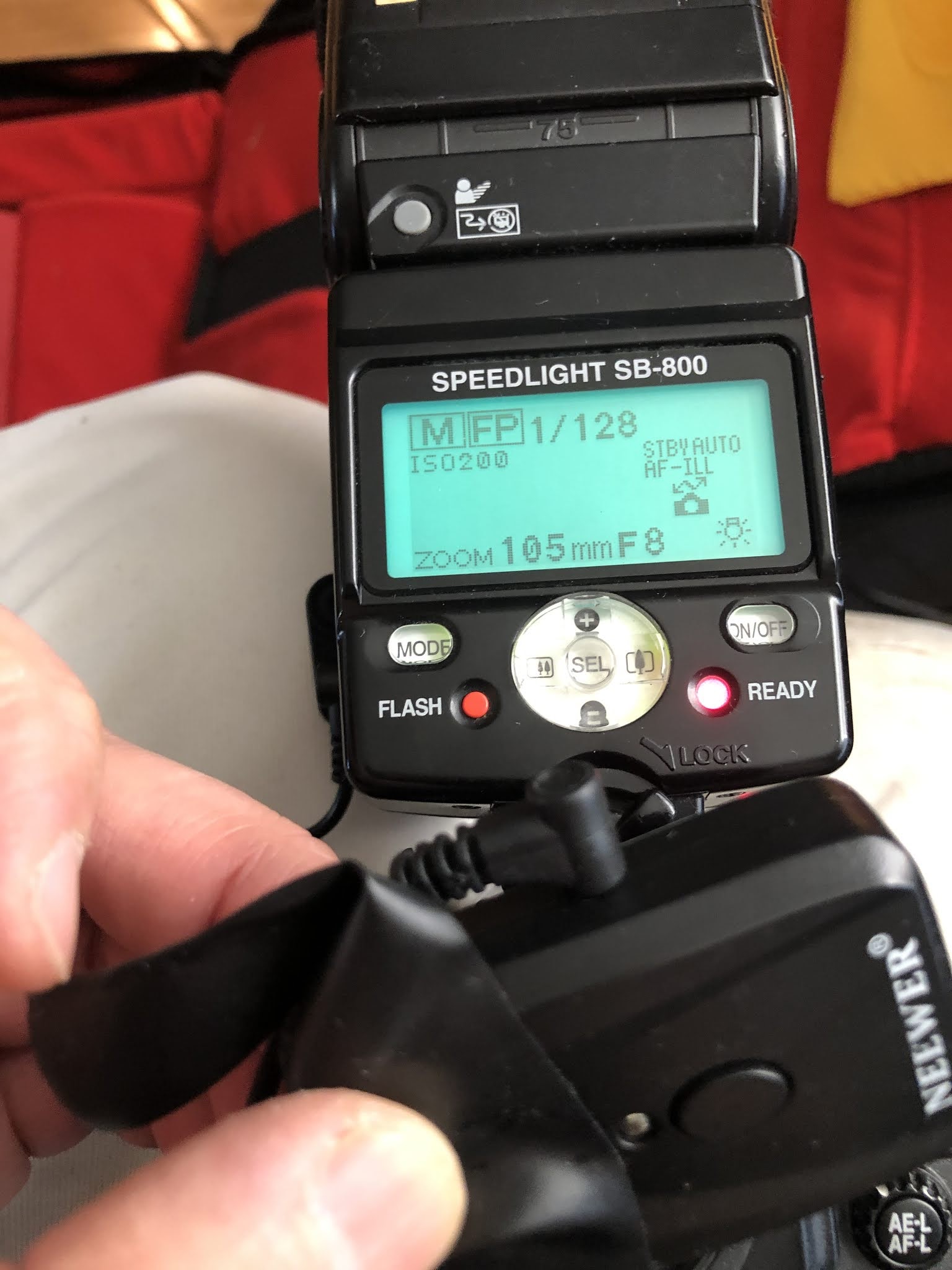
However if I were to attach my Nikon SB-800 to the hotshoe of say my D700, Hypersync from my Sunpak 120J is possible.
I need to run a sync cable from my SB-800 to the transmitter. Then connect the receiver to the sync terminal of the 120J.
The D700 is set to do AUTO-FP at 1/250. Honestly I don't know if it's at or above or just above that speed then the camera and the speedlite will do the high speed sync, that's producing pulses of light as if continual lighting for the duration of the exposure.
For this to work relative well, I have noticed the following. There is really no black band on the frame but for high speed and small aperture, say 1/1000 and f/16, the picture looks darker. And the bottom of the picture looks brighter regardless.
Let's say I shoot about 10 ft away subject to 120J, at full power, and it says f/16
My SB-800 is set at 1/128 power as I only use it as a trigger not as a flash.
So here is my settings
D700, at 1/1000, f/8, 2-stops lower than my 120J says.
Sunpak 120J: full power
That's it, full blast and the picture looks good no black bar at the bottom.
Conclusion:
I have a pair of Godox CellsII-N which is bigger and supposedly do some hypersync. But the trigger sometimes fires randomly. So I don't like them. Plus it's only 2, one is transmitter one is used as a receiver. So any time more than 1 light is impossible. Even though most of the time I shoot with one off camera light anyway.
With this SB-800 hack I can run two 120J at full power blasting off and still run at 1/1000 or higher and the triggers is cheap and pretty reliable in my book. It can run at regular sync or hypersync, so it's all good. And if I want I can run the SB-800 as fill flash as well in addition of being a trigger only; so three lights.



Strobe qflash model T
Latest fascination
The Quantum qflash.
I couldn't find any difference between T and T2. I think if I don't ever use any TTL then perhaps it doesn't really matter.
One is untested and is on its way. I am taking a chance as it says it's untested except it can power on. What does that mean, the most optimistic scenario is the unit actually works it's just than the vendor is being very forthright telling you that the unit hasn't been fully and completely tested. I wonder how many sellers actually test the whole feature set, I mean do they see if the flash duration is actually within spec at 1/2 power for example? I don't think so. Or the TTL actually works? Or the slave feature works?
Instead of getting an extra Powerpack like the Godox PB 960, I opted for the silly power pack from maxxpower. When I first got my Sunpak 120J that's what I got for the power. But now the powerpack can no longer be charged. I wonder if it's because it hasn't been used and needs to be awaken. But then I have no way to awake it or know if it's just sleeping.
Also ordered a TR 2000 cable, which doesn't fit right into the Sunpak 120J; it needs a 3 to 2 prong adapter which I have with the original TR-PAK II I got years ago.
Or I can order a quantum turbo extension cord QT49 to run 2 120J from one PB 960.
I sort of create my own problems and look for solutions on eBay.
Thursday, January 21, 2021
2015 MBP SSD and Big Sur Upgrade
If you do a search you probably would find lots of pertinent information.
The 13" 2015 MBP is on its last leg on being able to upgrade to the current macOS. There is no way I can upgrade my 2008 MacPro and 2012 MBP to Big Sur without major major hassles. They are in Catalina already.
The original 13" 2015 MBP came with 128GB of SSD. This certainly on the meager side. I changed the battery a few months ago after it started to bulge.
I gathered 3 items to do the upgrade.
1. The Rongdeson M.2 NVME SSD enclosure
2. SPG SX8200 PRO 512GB
3. Sintech NGFF M.2 adapter card
I didn't bother to backup anything on TimeMachine or otherwise. Just do it.
Put 2 into 1. Connect to the MBP, erase the new SSD into APFS and the rest default values.
Upgrade the MBP to Big Sur by downloading and installing on the new SSD
The upgrade will prompt you for anything it needs and it also prompts you to migrate your existing Mac to the new Mac, ie copy the old SSD data to the new SSD.
After the migration, the last step is to turn off the MBP, open the bottom cover, unplug the battery, remove the old SSD. Remove 2 from 1. Then slide 2 into 3 completely. Take 3 with 2 attached and plug 3 into the existing slot, make sure they are inserted all the way. It's like at an angle, seat it and screw it down. Plug the battery. Put the back cover back on and the screws.
Turn on the MBP, answer a few prompts like verify your Apple ID and stuff. That's it.


this is the swapped out old 128GB SSD, it's not M.2 or NVMe.
Wednesday, December 02, 2020
LG WH14NS40 1.03
Finally downgraded the firmware to 1.02
Hopefully there are many more years to come for VLC, MakeMKV and LG to live happily ever after.
Friday, November 06, 2020
macOS 10.15.7 Supplemental Update
Apple released this update on 11/5. It wouldn't be a pain if your Mac is supported. For me running on macpro3,1 with unsupported GPU, it's a major pain.
Maybe one day I will finish this update or maybe not.
Or maybe I will get a Mac supported GPU so I can do the boot screen thing when updating.
Too much work for me.
Post Stamp
Once upon a time when I studied law, the post stamped date determines the date of acceptance, not the date of receipt. That's if one actually can read the stamped date on the envelop and the mail is delivered promptly without undue delay like a year later or never.
I don't know what is the rule for the US Election, it seems like people make up the rule as they go. My initial impression was the ballot mailed on Election date should be counted even it came after the Election date. Mail in ballots are a little mess given that plenty of people can't follow instructions, mostly people do not sign the envelop or cross the ovals instead of filling the ovals . . . . When one casts the ballot on site, those errors can be avoided or corrected right away. If you take any public exam in multiple choice format, those answers would be discarded as you can't follow the instructions. I don't know how those ballots would be treated like without signature or marking it kind of wrong. Or "lost in mail" or "stuck in the post office" or simply delivered days late or no clear readable postal stamped date on it.
Perhaps these errors, if any, may not be statistically significant to be important to the outcome of the race.
Friday, October 09, 2020
Catalina 10.15.7
Even Mojave has some supplemental update and security update.
After a few months I itch to upgrade again.
No surprise, the Catalina patch still won't go through the second phase.
Every time I do this I do this in a feverish pace and in the end, I don't know what I am doing.
But I have to say I am calm and a little bit more prepared. When it failed to boot up to continue the second phase. I was able to recover from the Mojave recovery snapshot though I forgot the details. But it certainly emboldened me to go really to Catalina instead of just going update Mojave as I know initially I was able to upgrade to Catalina but somehow in subsequent update I wasn't able to complete.
No surprise I wasn't able to go to the second phase of the patch to complete but then it didn't destroy the last bootable OS I was able to boot back holding the Alt or Option key.
So here are the steps
Download the latest Catalina patch from dosdude1
Make the USB drive
Boot from the USB drive (for me I have to switch back to the supported GPU card, otherwise I can't do this ALT boot sequence)
The installation reboot and back to the USB installation screen and in some instances it gives me the mouse setup, just click Next or similar to back out
Reboot holding down Alt key, you should see the Install partition of whatever it's properly called, you should see the USB and other possible Boot EFI from previous failed upgrades but pick the installation thingy you've never seen before that was just created in the first phase of the update
This should complete the second part of the installation.
Once it reboots you should be home free
Good luck.
PS: you won't be able to stream Netflix on Safari, but Chrome is perfectly fine.
Thursday, September 03, 2020
Catalina 10.15.6
I have bad experience with Catalina hack with my MacPro3,1. But that's a hack so I can't really be too angry with things don't work out.
My MBP mid-2012 is officially supported and the update is officially approved.
It took forever to update and when it's done the system is crawling and worse the system refuses to charge the battery.
I re-install the macOS hoping that it may correct something. I started the re-install in the afternoon, maybe around 4PM it just won't finish, and at 6AM the follow day it was still updating.
When it finally finished, the same thing. The system is crawling and the system refuses to charge the battery.
I think this is the worst ever upgrade I've ever experienced.
Thursday, June 18, 2020
LG WH14NS40 NS50 ROM VER 1.02
I thought I have it set for a long time. I even ordered a couple more Blu-ray. Then one arrived and the disc doesn't mount. I thought it was a bad disc. It happens. But then I tried others, didn't work either. I know there is a problem. But where exactly I wouldn't know. The drive seems to be spinning just fine. I took the drive apart and cleaned it twice. The lenses don't look dirty at all.
The fact that I am running a few hacks on my system doesn't help.
The original Superdrive works somewhat but over time, it would just disappears, so I don't know what the deal.
I was planning to bite the bullet to get another one but it's just hard to be all that lucky to be able to get one with the exact firmware I want without flashing.
Anyway to be continued.
The fact that I am running a few hacks on my system doesn't help.
The original Superdrive works somewhat but over time, it would just disappears, so I don't know what the deal.
I was planning to bite the bullet to get another one but it's just hard to be all that lucky to be able to get one with the exact firmware I want without flashing.
Anyway to be continued.
Tuesday, June 09, 2020
High Speed Sync
I always thought the built-in flash of my Nikon cameras can do high speed sync on its own. Wrong!
How often do I flash? Not too often. And when I flash I either flash using the SB-800 or my Sunpak 120-J. And honestly I seldom use high speed sync and when I do it's with an external Nikon flash like the SB-800 or my broken SB-600 if I ever did. But I always thought it can be used with the internal pop-up flash.
Well today I tried because I was too lazy and too weak to carry an external flash and a battery pack let alone any trigger or light stand. It's not worth it.
So I thought that little flash can sync above 1/320. Wrong. The fastest it goes is 1/320. So the pictures can't be too crispy. But then again it's not at all that bad if you manage to catch the right moment and don't look at it at 100%.
Right now I almost think it's imperative to shoot with a flash otherwise the pictures look kind of flat and lifeless. But that's just one man's opinion.
How often do I flash? Not too often. And when I flash I either flash using the SB-800 or my Sunpak 120-J. And honestly I seldom use high speed sync and when I do it's with an external Nikon flash like the SB-800 or my broken SB-600 if I ever did. But I always thought it can be used with the internal pop-up flash.
Well today I tried because I was too lazy and too weak to carry an external flash and a battery pack let alone any trigger or light stand. It's not worth it.
So I thought that little flash can sync above 1/320. Wrong. The fastest it goes is 1/320. So the pictures can't be too crispy. But then again it's not at all that bad if you manage to catch the right moment and don't look at it at 100%.
Right now I almost think it's imperative to shoot with a flash otherwise the pictures look kind of flat and lifeless. But that's just one man's opinion.

Wednesday, May 27, 2020
Mojave 10.14.6
After downgrading this back to 10.14.6 it has been solid. No more booting up to recovery or can't wake up, which I think is related to APFS not being supported in MacPro3,1 and somehow the patch can't handle it.
I need to resist the ever desire and urge to upgrade to the latest patch.
I need to resist the ever desire and urge to upgrade to the latest patch.
Wednesday, May 20, 2020
Convert MKV to M4V
It took longer than I'd like.
The MKV is > 2 hours and has a size of 36GB.
The M4V is 4.46GB and it took almost 3.5 hours to convert ...
The MKV is > 2 hours and has a size of 36GB.
The M4V is 4.46GB and it took almost 3.5 hours to convert ...
VLC plays Blu-ray disc
Finally got VLC to play blu-ray disc on my MacPro3,1. Sure you need MakeMKV in order to make all this work.
My next frontier is to play 4K UHD disc on it.
My next frontier is to play 4K UHD disc on it.
Saturday, May 16, 2020
MacPro3,1 10.14.6
Downloaded JRE 8 something something and now the Blu-ray menu can be played. I understand my player can even play 4K though I have yet to own any 4K monitor but I'm interested to see a scaled down 4K picture on my monitor. It's hard to believe Blu-ray is only 1920x1080.
The temptation to upgrade to the latest is always there. I am still itching to update to 10.15.4 but past experience really left me with a bitter taste.
10.14.6 seems to be very stable for what I do and experience.
The temptation to upgrade to the latest is always there. I am still itching to update to 10.15.4 but past experience really left me with a bitter taste.
10.14.6 seems to be very stable for what I do and experience.
Friday, May 15, 2020
macpro3,1 Mojave 10.14.6
I demoted the OS back to 10.14.6 Mojave
For some reason 10.15.4 Catalina just wouldn't stick.
I've spent a few days trying to fix that but no luck.
One good thing came out of this is with the latest vlc 3.0.10 and MakeMV, I can finally made Blu-ray disc playing a reality. I don't know if I overlooked previously. Or 3.0.10 is really a new new one, or MakeMV. It was just a feature in MakeMV to allow itself shared the decoding libraries or something. Previously, I mean the sticky note on MakeMV forum still has that old information.
So it couldn't be simpler.
For some reason 10.15.4 Catalina just wouldn't stick.
I've spent a few days trying to fix that but no luck.
One good thing came out of this is with the latest vlc 3.0.10 and MakeMV, I can finally made Blu-ray disc playing a reality. I don't know if I overlooked previously. Or 3.0.10 is really a new new one, or MakeMV. It was just a feature in MakeMV to allow itself shared the decoding libraries or something. Previously, I mean the sticky note on MakeMV forum still has that old information.
So it couldn't be simpler.
Subscribe to:
Posts (Atom)
-
 11:50PM. It's ten minutes before midnight. It's another midnight and it's not. It's going to be a spanking new year. Ye...
 -
Cho produced and sent out a multimedia press release to NBC in the 2 hours between his first shooting and the later mass murder and suicide ...
-
Nowadays I loathe to have my haircut, that's why I seldom have mine cut, maybe once or twice a year. I went back to Chinatown. I could ...