Showing posts with label Canon New F-1. Show all posts

Wednesday, November 28, 2018

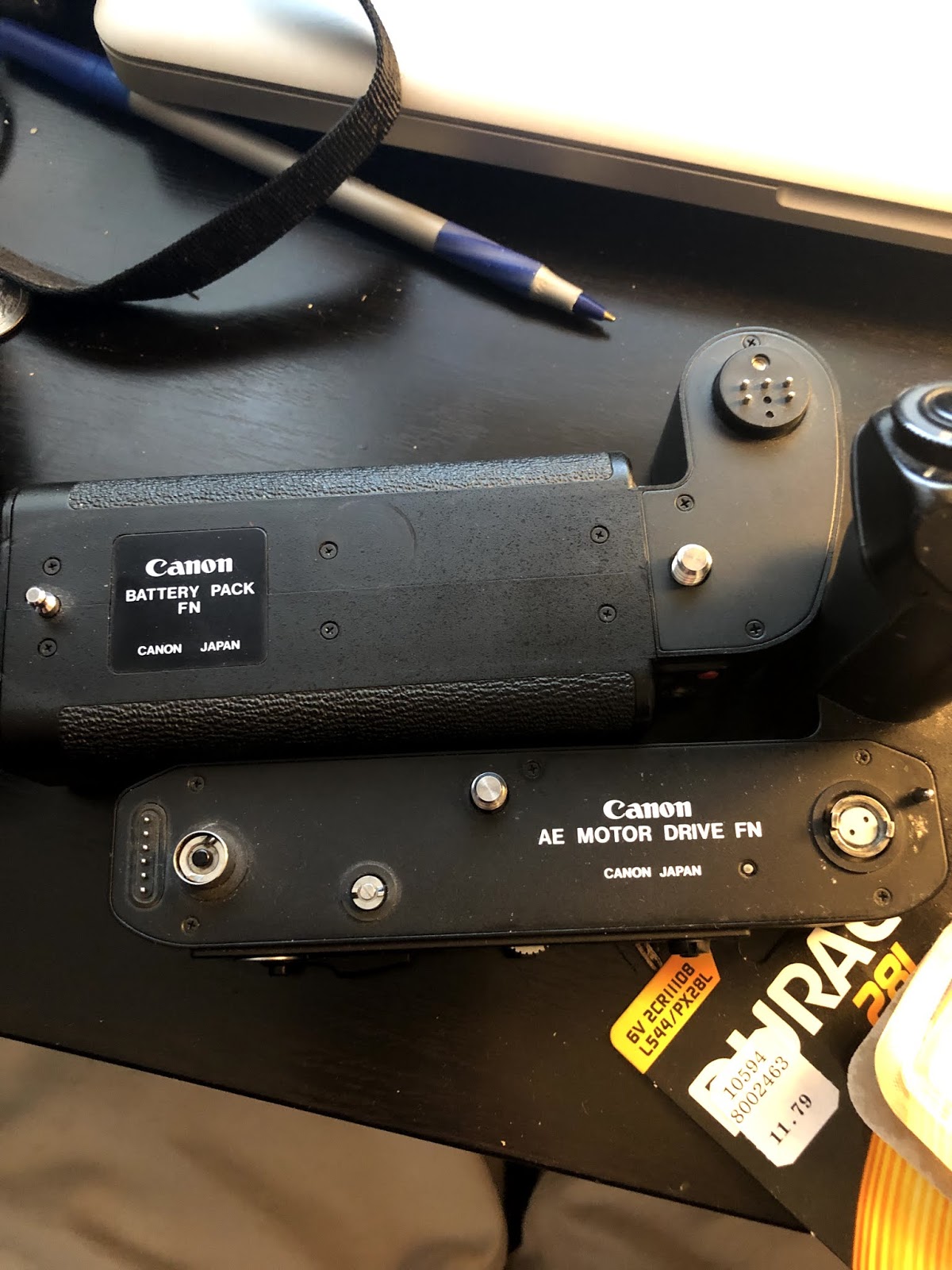
Canon New F-1, AE motor Drive FN, Battery Pack FN

I bought the Duracell 28L which is a 6V cell compatible with L544 which is what the Canon New F-1 needs, not only for metering, shutter release but also for the operation of the whole motor drive mechanism.  That's even if the motor drive is fully powered by 12 AA batteries, it won't release the camera shutter or wind the film transport forward at all.  What it works, without the 6V battery, is the meter and the rewind actually, surprise (I haven't actually tested with a film cartridge inside, but the rewind seems to work when the motor drive is not attached to the camera or when attached but quickly stop as the counter hits 0).

So the conclusion is the 1.2V AA rechargeable batteries do work with the motor drive even it's 1.2V not the 1.5V.  The 6V L544/28L battery is required for the motor drive to operate.  A depleted 6V battery enough to operate the meter and even the light but not enough to operate the shutter won't allow the motor drive to run.  So you can't run the motor drive at all if your 6V in camera battery is depleted.

These are the quirks of the system I found.


Monday, November 26, 2018

Canon F-1

The shutter of the Canon F-1 will always stay operational if you remove the battery, i.e. short of any malfunction of the camera.

If the 6V battery is drained, the shutter release won't work even some shutter speeds are mechanically activated.  You need to remove the battery for it to work.

From 1/125s to 1/2000s, flash sync ⚡️(at 1/90s) and B are mechanical.  The good news is all other shutter speeds will "work" too but default at mechanical 1/90s when the battery is removed.

I must have read about it but forgotten.

The Canon F-1 is such a beast, it simply refuses to die or stop working.

Canon Battery Pack FN

This is the battery pack that takes 12 AA battery cells.  It has been working since I bought the set in 2010.  Then it stopped working as the battery drained.  I have never used any rechargeable cells with this.

This past weekend I went to IKEA and bought a bunch of rechargeable cells.

Unfortunately they don't work inside this Canon pack.  They mystery is is the pack broken or does it demand the 1.5V per cell very strictly?  The IKEA cell called LADDA is rated at 1.2V at 2450mAh.

I have yet to buy a whole bunch of cells to test it out.  The pack has no response if I set to it OFF, which is expected, but neither is S and L.  The only time the pack is making an effort as if it's trying to wind the film it's when I set it to H.  It makes some grinding noise as if it's trying very hard to advance the film.  I don't believe it's the contacts or something with the camera itself.  It's either the motor is broken, the switch is broken, or some combination of such, or the pack is working but it has no leeway in terms of voltage.  Though that's a bit hard to believe.  I tested the LADDAs in my Nikon F5 and my Sunpak 120J, the batteries have juice to power them.

I know next to nothing to electricity but I read usually the 1.2V would work on 1.5V appliances as when loaded or when over time, the cell can hardly stay at 1.5V.  But the fact that it takes 12 of 1.5V batteries, if replaced by 1.2V then the voltage variance can be quite big when magnified by 12.

I wonder why I don't just go out and buy 12 of those one time use 1.5V AA cell to prove this theory one way or another.

My initial thinking was something wrong with the "motor drive" or even the camera.  But as I did some trouble shooting here and there, I changed my mind.

This battery pack is really just a pack.  It's separate from the actually mechanism that drives the film, which is done by the AE MOTOR DRIVE FN.  The AE MD FN itself doesn't have any power source and it's a separate piece of equipment.

Wednesday, November 10, 2010

Veterans Day


The top and bottom ones have better white balance.  The middle and bottom ones come from the same frame, just different scans.

Technical details:  The negative (bottom) curves so much so that it presses against the glass in the middle.

Thursday, November 04, 2010

Times Square


Kodak 160VC, Canon New F-1, Canon FD 28mm f/2.8, and yes with the ridiculously heavy motor drive too.

Sometimes I wish I were shooting with a 24mm on a real 35mm camera.  But other times, I was like oh the 24mm is just too "wide" for that shot.  You know I am just hopelessly good at coming up with lame excuses.

I got this roll of 135mm film developed some lab closeby.  It wasn't a good experience.  The fact that I used that lab knowing full well they kind of don't give a fuck of the negative is testimony to how lack of principle I am.  This was my third roll of film done there and might very well be my last roll.  In theory, any mini-lab can do a decent C41 development, that's if they take pride in what they do.  In practice, it's like nobody gives a fuck even some so called pro lab.  I got my film ripped and they had the ball to deny it.  Again, you got what you paid for if you are lucky.

I know this sounds absolutely ridiculous but I really find digital images too clean to look almost dull and lifeless.  I cannot believe I said that.  At the same time I hate to scan the images knowing it's really hit or miss to get a clean scan with no dust at all.  ICE is not 100% and plus there is no ICE with the software that I use.  So it's a pain to scan.

UPDATE 11/5/2010
I have received tons of emails regarding how I scanned what I scanned.  If it's a good scan, it's because of me and myself.  Nobody helped me in that department.  OKAY there is some online who selflessly shares his knowledge and thoughts on scanning.  And one of them is Mr. Wayne Fulton who operates a website called very humbly Scanning Basics 101 or www.scantips.com which I find to be most helpful though I don't understand most of them but it got me started.  I shall take all the blames for all the ugliness you see here, it's absolutely not a reflection of Mr. Fulton's fine website.  No guilty by association.

UPDATE 11/5/2010
I don't know how the heck I removed the picture hyperlink.  Crap.

Horsey

School


Kodak 160VC shot using a Canon F-1, 28mm f/2.8. Scanned at 2400dpi.

Sunday, August 08, 2010

Ubuntu 10.04 and Epson V500 Photo

The above award winning beautifully taken picture is originally in Kodak positive.  It was scanned by scan master me and myself using sucky Epson 500 Photo and Image Scan! for Linux running on Ubuntu 10.04.  Auto color "corrected" in GIMP.  The Kodak slide is of unknown expiration date.
Shot in Bryant Park, NYC.

Ubuntu 10.04 has been pretty stable.  My wireless configuration is still funky and finicky.  But for the most part it works though there is no way to know to get it work consistently, but as long as it works I am not going to touch it.  Switching between users still hit and miss.  Searching and installing new software doesn't seem to be as good as before.

Anyway.

I was able to hook up my Epson V500 god awful scanner.  It wasn't exactly plug and play.  But it isn't too hard either.  If I can do it, you can too.

Go to Epson website or simply Google it, search for Epson V500 Photo and go to support
Go to download driver.
You will be prompted to go to outside Epson, that's go to avasys for the files.  You need to pick your scanner and platform.
Here's how to get Image Scan! for Linux to work:-
Download the deb data, core and plug-in packages, at present 32bit versions are called iscan-data_1.0.1-1_all.deb, iscan_2.25.0-l.ltdl7_i386.deb, iscan-plugin-gt-x770_2.1.1-2_i386.deb.  Install them in that order by simply double-clicking them.  Wow, don't even need to do command line.  I know you're going to miss that.
For me I need a reboot for it to recognize the scanner.  Image Scan! for Linux is pretty straight forward and has a clean interface that I like.  For the kind of scan I do, the simpler the better.  Download the Image Scan! for Linux pdf guide userg_revL_e.pdf for more details.

update 9/25/2010
The 64 bit install works just as well.

Saturday, April 17, 2010

Take Stock


Incidentally, the upside down Chinese character rightly describes what I have been going through for the last two months.

Friday, April 16, 2010

Light Seal Replacement for Canon New F-1

Though the Canon New F-1 (damn Canon for their stupid naming, couldn't they think after a few years, everything called New is not new anymore) is my latest addition to my ever growing meager camera collection,  I think I just got to know it better than the rest of the members.  I got to see its more naked body more intimately.  I just did a light seal replacement for it.  So it's like brand new now (of course not).  There is not a lot of seal to remove and replace.  One on the hinge, one in the mirror box, and two thin ones running along the camera body where the film door closes onto the body.  I used some 75% rubbing alcohol to remove the dead gummy foam and then replaced them with something I ordered on eBay.  These are cutups specifically made for the Canon New F-1.  So there is no measuring and  minimal cutting.  Overall the instruction is OKAY but it could be better.  But it's really not that complicated.  The foam on the mirror box used to be just barely there now it's pretty well dampened.  So overall I am pretty happy with this $10 purchase.  The price seems a bit high for the little material in the envelop but it works well and it's just the price of a decent lunch, plus the vendor is fast and responsive, so in the end I can't really complain.

Thursday, April 01, 2010

Canon New F-1

This is part of my ongoing Canon New F-1 usage notes.

Battery:  It's used to power the meter and the shutter.  Though some shutter speed is governed mechanically, whatever that means, but if you were to leave an underpowered battery there, the mechanical shutter won't work.  You have to actually take out the 6V battery from the chamber.  This is actually documented on some online manual.  Not really a surprise.

Even if you attach a fully powered, that's a green light battery power checked AE Motor Drive FN, but if the camera battery 6V is low, the shutter would get very iffy and the meter would go haywire--mainly if turned to Light metering mode, the needle would keep going up or to the right if set at aperture priority as if there are plenty of bright light, giving a reading that's inconsistent with Normal and Hold.  That's my experience.  My 6V battery went low in the middle of a shoot out--metering went haywire and shutter wouldn't fire, so I had to rewind the film back to its cartridge in order to remove the motor drive and change the battery inside the body.  Well that's how the Canon F-1 rolls.  So I think the motor drive, the battery there, is really for winding and rewinding the film, it has nothing to do with the meter and the shutter on the camera.  It's just a guess on my part.

Still, I have no idea what the camera is officially called.  Is there really a Canon F-1N or Canon F-1n at all?  I know there was this original Canon F-1 but I am just not sure anymore if the Canon F-1N or Canon F-1n is the same as Canon New F-1.

Thursday, March 18, 2010

Canon New F-1 And Motor Drive

Here is something I discovered.  My point of reference is the Nikon FE and F5.  Though it probably isn't an apt comparison considering they are really vastly different cameras.

I think the F-1's motor drive connection is a bit convoluted.  And sort of a disaster waiting to happen.  You really have to plan ahead and decide at least a roll of film ahead whether you want to shoot with a motor drive or not because you just can't change your mind in mid-roll.  Why?  Because, at the bottom of the camera plate there are three coupling holes (what am I talking about?), you need to remove the three small coupling (love the word) covers before you can attach the motor drive to the camera.  One of those holes (love the word) provide the motor drive's access to the film cartridge for film rewind and if left exposed or un-covered it would fog the film.  Hence you really can't take out the motor drive in mid roll or attach a motor drive in mid-roll.  Not a great idea.  Those tiny covers you need to use a coin, say a quarter to screw (love the word) in and out (love the allusion), and they are prone to just disappear--of the three covers, the AE coupling cover was lost before I got the camera.  They are supposed to be screwed back in on the motor drive but if you were to lose the film rewind coupling cover, then you can't really shoot sans motor drive as the hole would expose the film--you are screwed big time.  What a stupid design.  My FE and its MD-12 don't have this problem, no small covers to remove and sure no rewind either.  But I can attach or remove the motor drive in a whim anytime I like.  The F5 comes with the the built-in motor drive.  I don't have the Nikon F3 and its massive MD-4 motor drive for comparison.  I guess the professionals always shoot the F-1 with its motor drive always attached--I know the prior owner does.  So they don't have this problem.

Notes:
Canon AE MOTOR DRIVE FN.  This guy is coin operated.  You can't attach the thingy by just turning the camera attachment knob, you really need a coin, say a quarter to screw or unscrew (especially unscrew) it.  Minor pain in the butt.
Canon BATTERY PACK FN.  Without it (or other power sources) the motor drive isn't really going to anywhere except acting as a grip.  Surprise.  Again this guy is coin operated.  You need to attach this puppy to the motor drive.  Plus this is where the vertical shutter release button is.  The chamber takes twelve AA batteries.  Twelve, that's right.  The battery compartment is unlocked by just sliding a locking lever called the battery magazine release lever, no need to use a coin, Wow.  This puppy lets you rip through a roll in 5 frames a second.  Wow.

Wednesday, March 17, 2010

Canon New F-1

Canon can be confusing.  The F-1 went through at least three iterations, the original F-1, then F-1N and the New F-1.  But just for kicks, Canon decided to just put F-1 on the body of these three models, unless you have done some homework, you wouldn't know which is which just looking at the bodies.  And oh yeah, when you start asking people Is that a New F-1, people thought you were crazy, they would tell you once again, it's an old used camera, then you have to say OKAY I understand...

All I know is the New F-1 allows ASA 6 to 6400 and there is no big self timer lever on the body.  That's how I tell if the F-1 is New or old, sure there are other differences but I just don't bother.

It's my experience that very often some Canon gears for sale inevitably got listed as Cannon and they can't be found if you just search using the Canon keyword.  Well, see the importance of spelling?  Chances are you may be able to steal a bargain from this misspelled Canon.  If I am looking for a Canon deal I would search for Cannon as well just to make sure I don't miss anything.

I was able to spot a Canon New F-1, 50mm F1.8 with AE Finder, AE motor drive and power pack, a bunch of films and a bag to carry them all, all for a very decent price.  And yes, it's listed as Cannon.

Barber Shop in Chinatown

 Nowadays I loathe to have my haircut, that's why I seldom have mine cut, maybe once or twice a year. I went back to Chinatown. I could ...